Microsoft Project Quick Trick: Attaching General Project Notes to the Project Summary Task

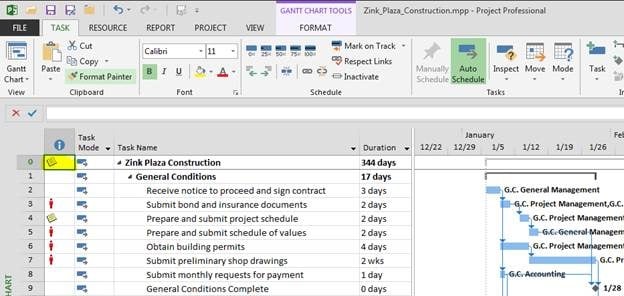
Perhaps you are aware that you can use the Task Notes feature in Microsoft Project to attach work details, update history, or other notes to individual tasks in a project schedule… but what if you want to store general notes in a project that are NOT specific to an individual task? You could store a Read more about Microsoft Project Quick Trick: Attaching General Project Notes to the Project Summary Task[…]
Service Pack 1 Now Available for Microsoft Office 2013, Project 2013, and SharePoint 2013

Microsoft announced today on the Office Updates blog that Service Pack 1 (SP1) is now available for Microsoft Office 2013, Microsoft Project 2013, and Microsoft SharePoint 2013: http://blogs.technet.com/b/office_sustained_engineering/archive/2014/02/25/announcing-the-release-of-service-pack-1-for-office-2013-and-sharepoint-2013.aspx They provide instructions and links to obtain SP1 from the Microsoft Download Center, as well as more detailed information describing the types of updates included for each Read more about Service Pack 1 Now Available for Microsoft Office 2013, Project 2013, and SharePoint 2013[…]

Quick Trick: Align Tasks and Gantt Bars with Grid Lines

Sometimes it can be difficult to visually align task rows in Microsoft Project with their corresponding shapes in the Gantt Chart: We can fix that in about 30 seconds by simply adding horizontal grid lines to the Gantt Chart to help align the left task rows with the Gantt shapes. Click the ‘Format’ tab in Read more about Quick Trick: Align Tasks and Gantt Bars with Grid Lines[…]

Quick Trick: Add Contrast to Make Gantt Chart Progress Bars Easier to See

Although most of the functionality is similar to older versions, Microsoft Project 2013 has a cleaner, updated look… but you may find that progress bars in a Gantt Chart are a bit more difficult to see because of the lighter colors used: We can fix that in about 30 seconds by simply changing the color Read more about Quick Trick: Add Contrast to Make Gantt Chart Progress Bars Easier to See[…]

Can’t Hide a Field in a PWA View? Push It!

If you build custom PWA views and have the need to hide certain unnecessary fields, but cannot because they are intrinsic to the view (such as a ‘Start’ or ‘Finish’ field in a Project Task view)… push it! In older versions of PWA, we had the ability to set the width of a field in Read more about Can’t Hide a Field in a PWA View? Push It![…]

Microsoft Project Conference 2014

It was my great pleasure to be selected as a speaker at this year’s Microsoft Project Conference. I had over 80 people attend my session so I was very happy but also nervous. It was my first time presenting at an event like this so it was a real pleasure. Microsoft organized a training session Read more about Microsoft Project Conference 2014[…]

Show Start and Finish Dates with Planned and Actual Indicators

If you regularly show ‘Actual Start‘ and ‘Actual Finish‘ dates alongside ‘Start‘ and ‘Finish‘ dates in order to show what has actually happened, here is a display technique that can save you some real estate in a view or report: placing a “P” next to the date to indicate that it is still planned or Read more about Show Start and Finish Dates with Planned and Actual Indicators[…]

EPMA to Exhibit and Host 5 Session at Microsoft Project Conference 2014

EPMA announced today that it is exhibiting at the Microsoft Project Conference 2014 on February 2-5 in Anaheim, California. Along with being an exhibitor they will also be hosting 5 informative sessions for attendees, covering product usage, best practices and a premier customer case study. The case study presented by both Saks Fifth Avenue and Read more about EPMA to Exhibit and Host 5 Session at Microsoft Project Conference 2014[…]