Microsoft Project Deep Dive: How Do Constraints and Deadline Dates Affect the Total Slack Calculation?

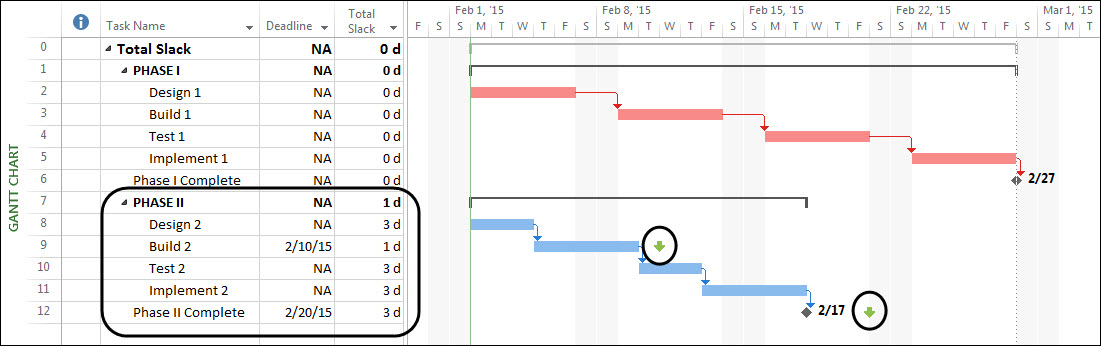
Background Information Recently, one of my fellow EPMA team members and I conducted three presentations for a large aerospace manufacturer. These presentations offered a “Deep Dive” into task planning topics such as using constraints, using task dependencies, and using Task Types. During the presentation on constraints, one of the participants asked if constraints affect the Read more about Microsoft Project Deep Dive: How Do Constraints and Deadline Dates Affect the Total Slack Calculation?[…]

Updating a Project Baseline in Project/Project Online/PPM

A project schedule is baselined to lock in the original plan. However, projects don’t always track to the baseline and it becomes necessary to re-baseline the schedule. Any further changes to a baselined schedule have to be approved from senior managers and stakeholders. A baselined schedule is generally re-baselined when the project undergoes major changes. Read more about Updating a Project Baseline in Project/Project Online/PPM[…]

Why are my Finish Dates Changing on my Fixed Duration Tasks in MS Project?

Many project managers who’ve previously worked in a Primavera environment, but who are now operating in a Microsoft Project Server system / Project Online, like to use Fixed Duration tasks because their behaviour is more like the behaviour of tasks in Primavera. However, many project managers also assume that if a task is a Fixed Read more about Why are my Finish Dates Changing on my Fixed Duration Tasks in MS Project?[…]

Getting Feedback from Team Members on a Project

Obtaining feedback from your team is not only valuable during project planning but also throughout the entire life span of the project.  A leading practice I share with clients and students is to use filtering along with the ‘Smart Copy and Paste’ features of Microsoft Project. These will pull out key information such as ‘Task Read more about Getting Feedback from Team Members on a Project[…]

Using Flag Fields to Automatically Format Gantt Bar Colors

Background A common request in the Microsoft Project user forum is to format the colors of Gantt bars automatically based on who is assigned to each task. For example, I want the Gantt bars for tasks assigned to the project manager to be formatted with the green color, while I want the Gantt bars for Read more about Using Flag Fields to Automatically Format Gantt Bar Colors[…]

Scheduling Constraints in Microsoft Project

In this video you will learn about scheduling constraints in Microsoft Project. Interested in how EPMA can help with your project schedules? Contact us today at 1.888.444.EPMA or [email protected]. Thanks for watching! Please feel free to leave comments below or check out our other blogs on Microsoft Project, Project Server, SharePoint and Project Management Methodology. Follow Read more about Scheduling Constraints in Microsoft Project[…]

Dale Howard Renewed as a Microsoft Project MVP

EPMA is pleased to announce that our Director of Training, Dale Howard, has been renewed as a Microsoft Project Most Valuable Professional (MVP) for 2015. Dale was first awarded the Project MVP title in 2004 and is currently one of approximately 61 Project MVPs in the entire world. The MVP title is not a certification; rather, Read more about Dale Howard Renewed as a Microsoft Project MVP[…]

Microsoft Project Quick Tip: Right Click on the Select All Button to Change Tables

Last month I blogged about my old friend, the right-mouse button. In that blog post, I discussed the many locations in the Microsoft Project user interface where you can right-click and use a shortcut menu to access a feature. Today I want to show you more about my favorite right-clicking trick. This is the trick I have Read more about Microsoft Project Quick Tip: Right Click on the Select All Button to Change Tables[…]